
An assistant that knows your airport
Running today at Mesa Gateway Airport, Palm Springs International Airport and John Glenn Columbus International Airport.
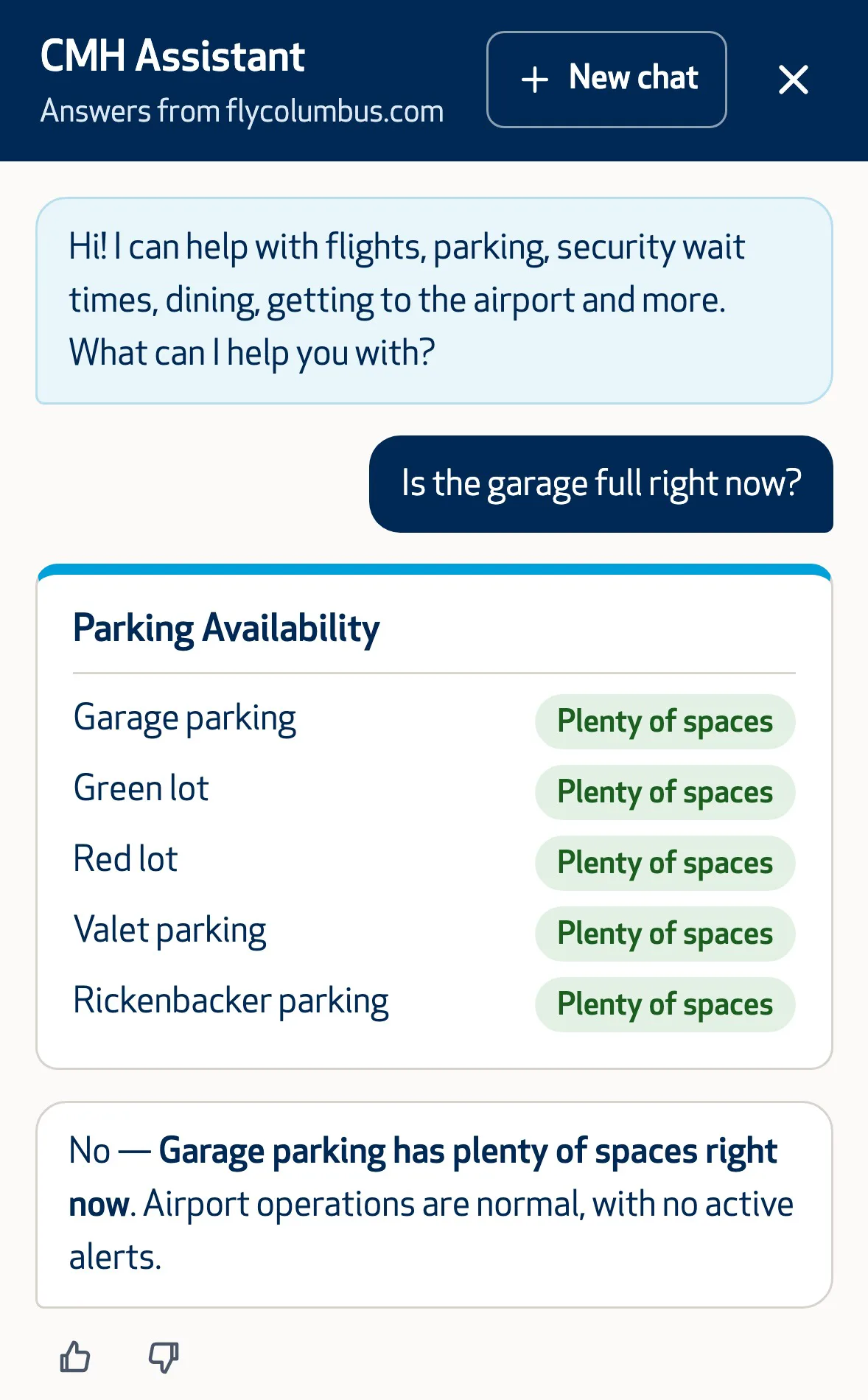
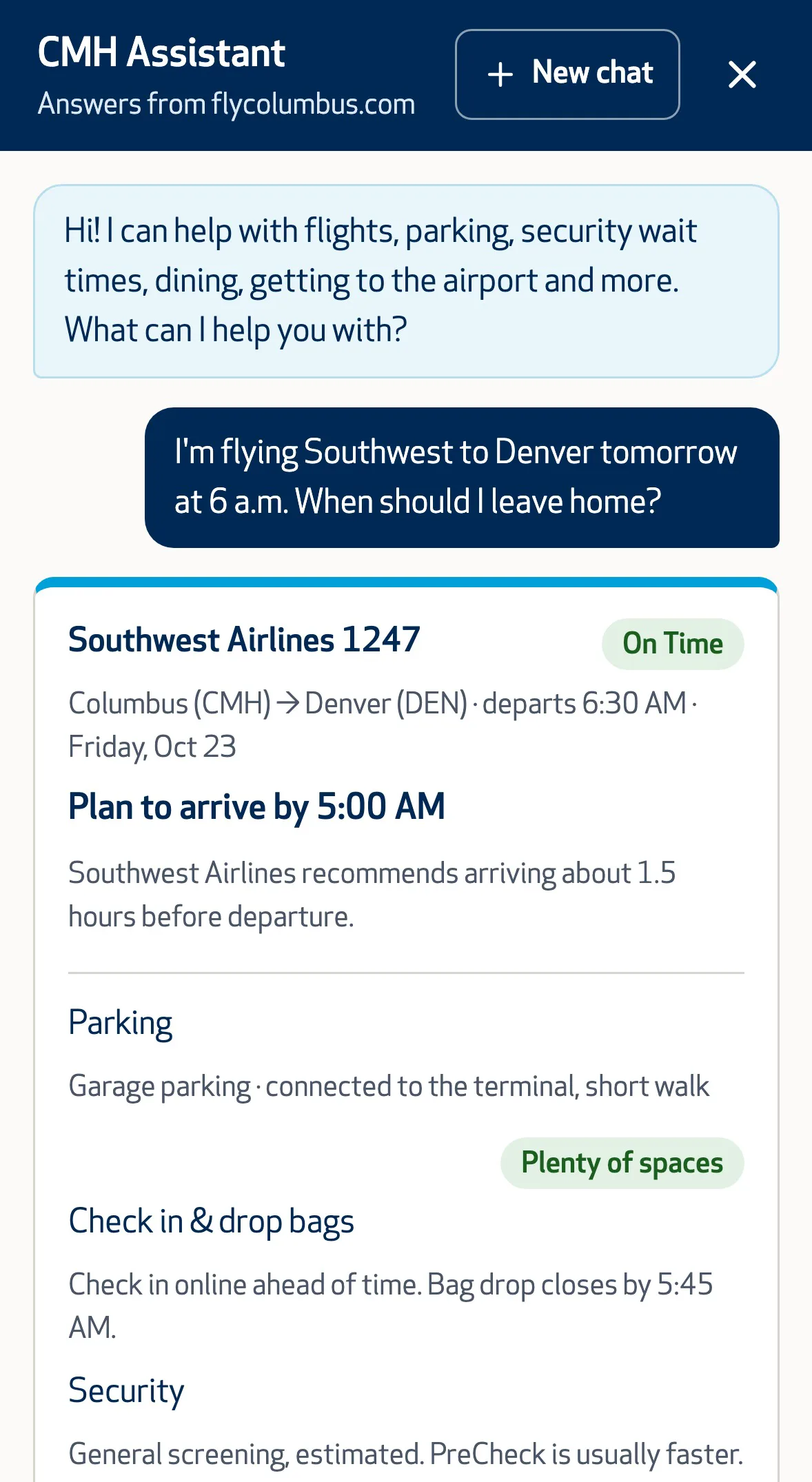
Ask it whether the economy lot is full, how long the security line is, or if there’s a nonstop to Denver, and it checks the same live feeds your website runs on. Ask where to find the noise complaint form and it links the right page. It answers in the traveler’s own language, and it can put together a one-card plan for the trip: when to leave, where to park and what to expect at security.
What it won’t do
- Make things up. No invented flight times, parking rates or links. If it can’t find the answer, it says so and points the traveler to the right page or person.
- Collect personal information. No names, emails, bag details or payment info. When a question needs those, like a lost item report, it links your own form.
- Speak for the airport. It won’t make promises on your behalf or book anything. Tickets go through the airline’s own site.
See what travelers are asking
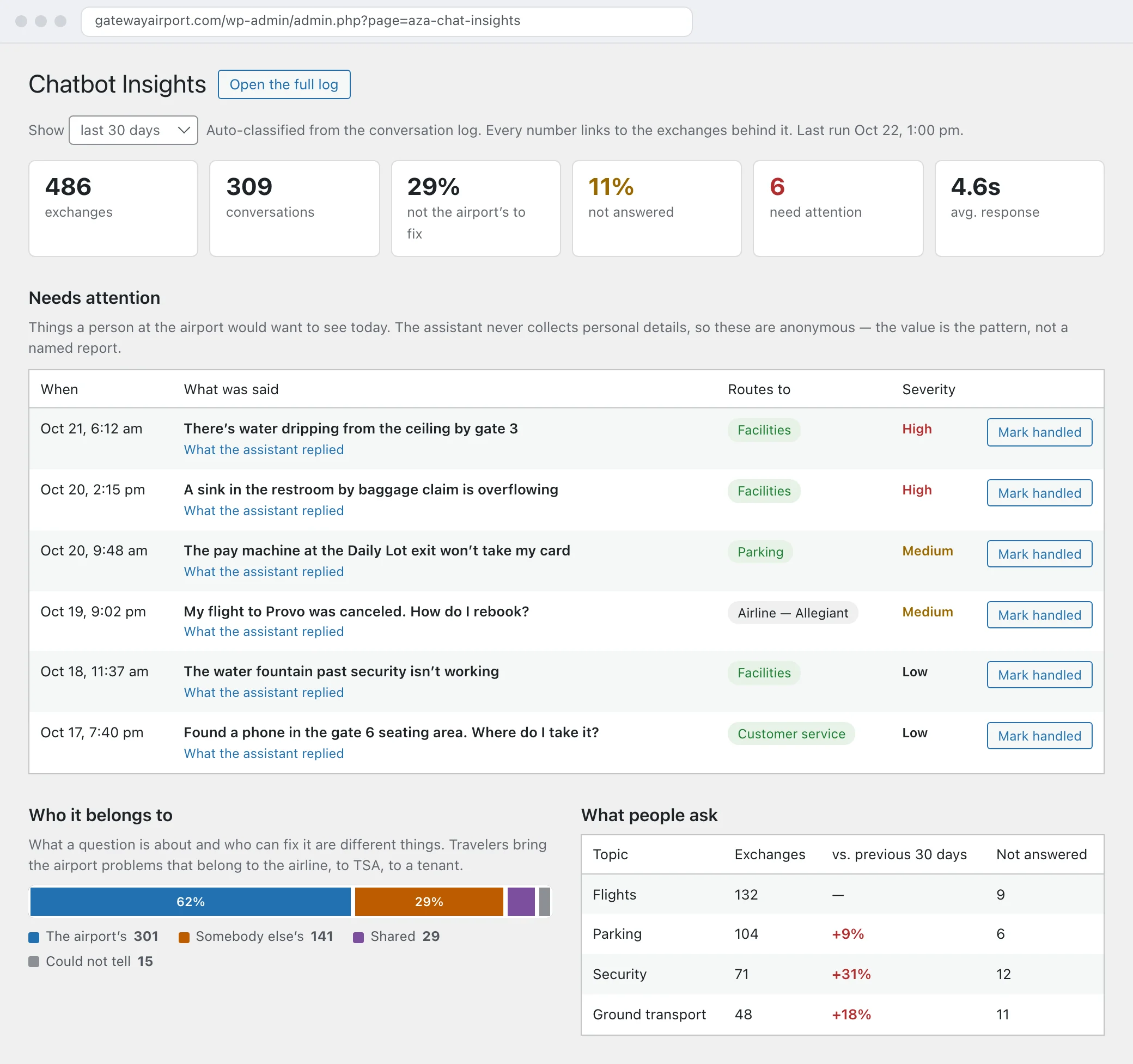
Every conversation feeds a private Insights screen in your website’s admin. It shows what people asked about this month compared with last, which questions the assistant couldn’t fully answer, and how much of it really belonged to an airline, TSA or a tenant. That last number comes in handy when the airline’s lost-bag questions land on your desk.
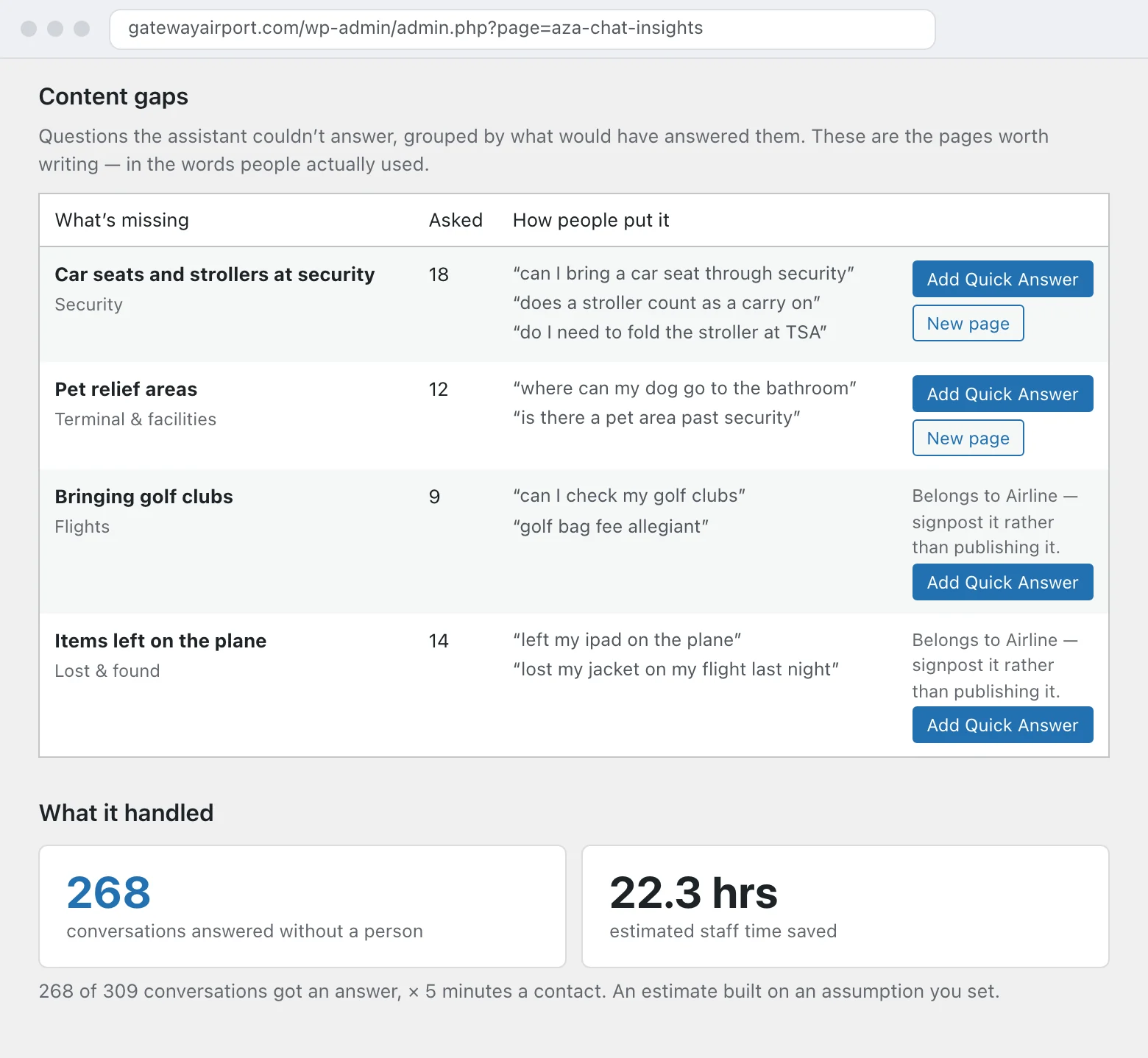
Questions the assistant couldn’t answer turn into page suggestions, written in travelers’ own words, so you know exactly what’s missing from your site. Insights also estimates the staff time saved by questions answered without a phone call or email, and a short digest lands in your inbox every Monday.
Change an answer in two minutes
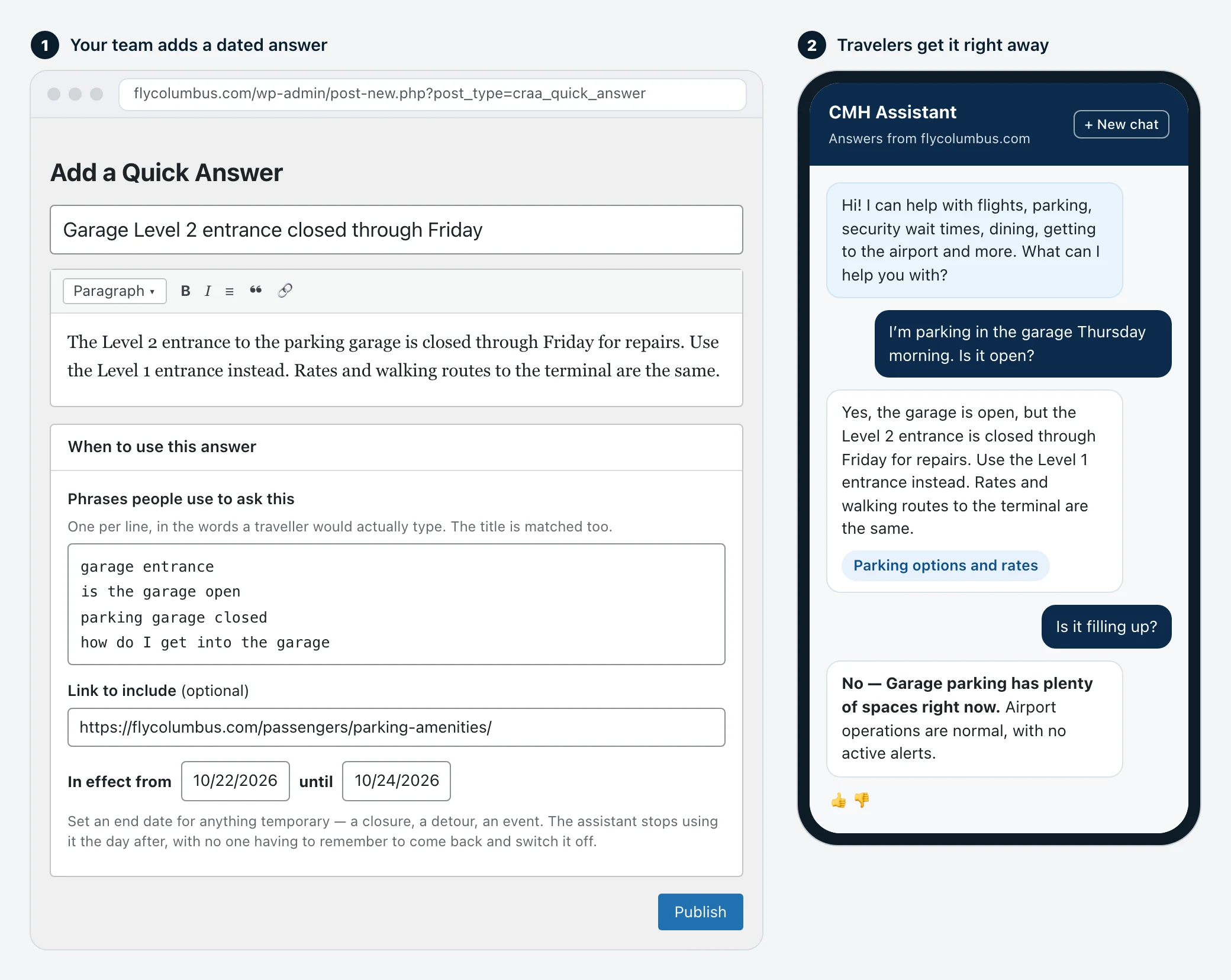
Plans change faster than web pages. Quick Answers let your team give the assistant a short, dated answer that it checks before anything else: the north entrance is closed through Friday, the cell phone lot moved, holiday parking rates start Wednesday. Set when it starts and when it ends, and it takes care of itself. No developer, no new page.
Operational alerts for the right team
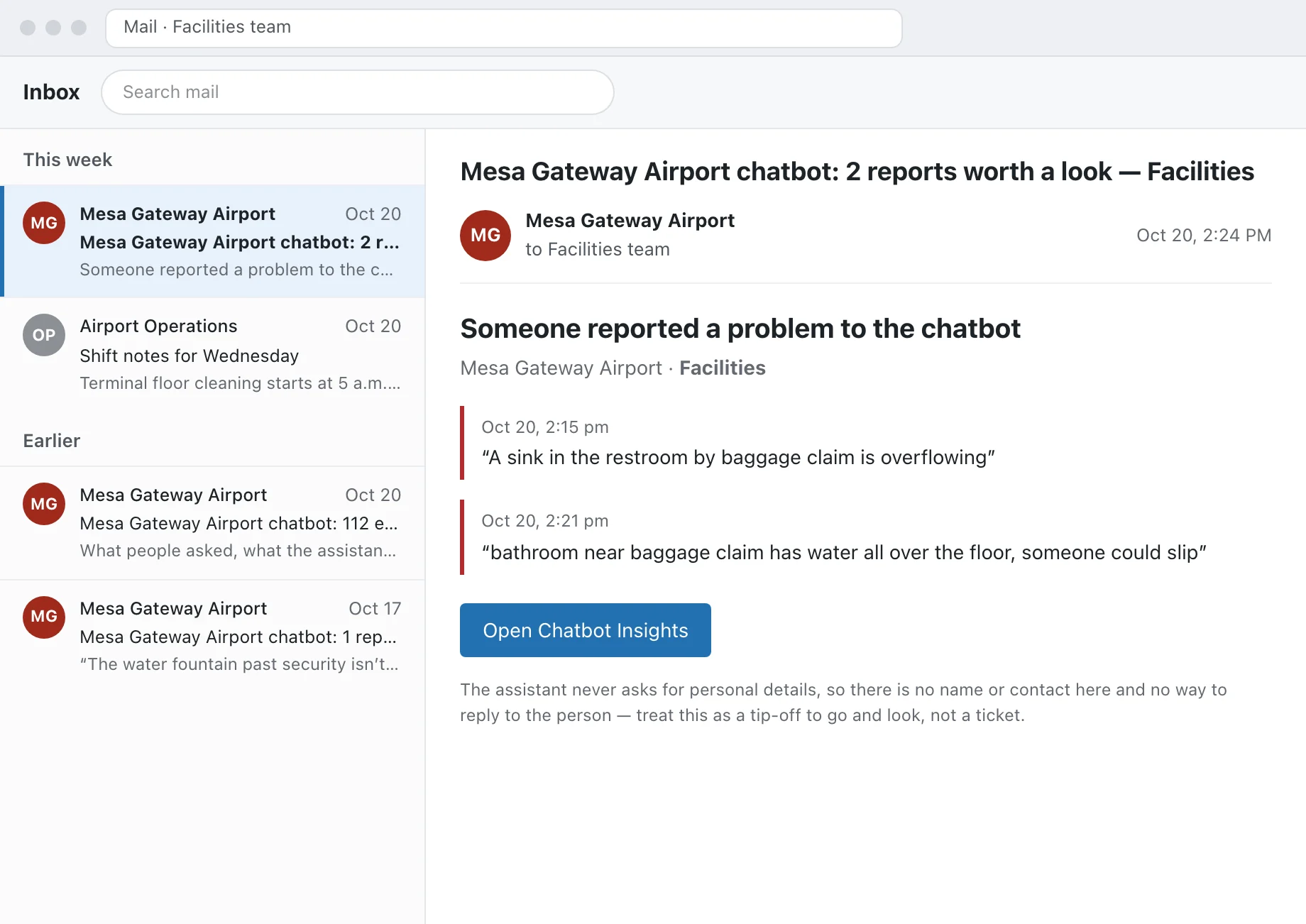
Travelers tell a chat window things they’d never call about. The restroom by gate B4 is out of order. The pay station in Lot C won’t take cards. Someone found a phone at the food court. The assistant sorts every report by topic and department, and high-severity operational issues are emailed to the team that owns them, whether that’s facilities, operations, parking or customer service. Everything else waits for you on the Insights screen.
For anything urgent, like an unattended bag or a medical emergency, the assistant tells the traveler to find the nearest staff member or call 911 right away, and the report is flagged for your team too.
Search that speaks airport
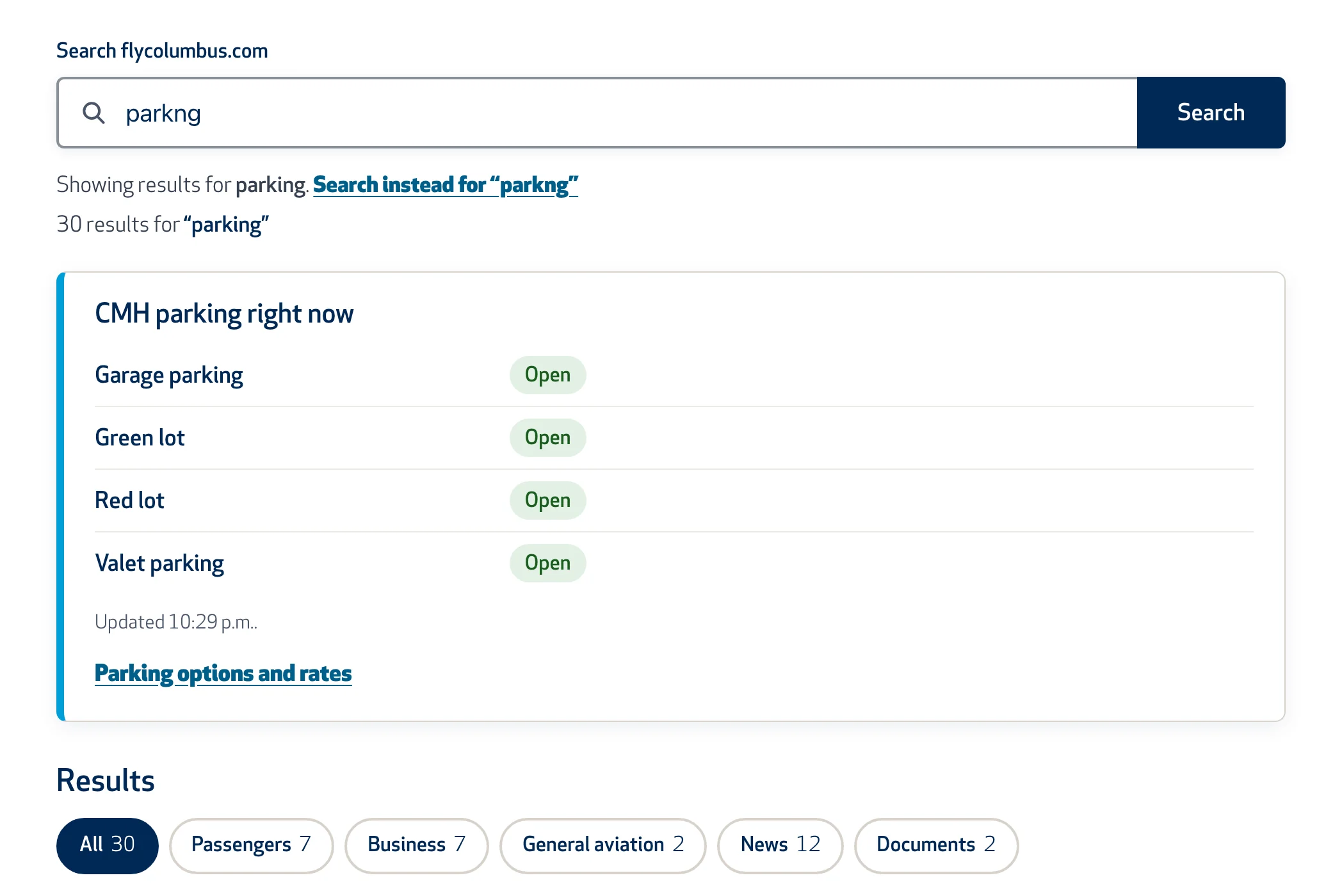
People search the way they talk. Our airport search knows that TSA means security and Uber means rideshare. Search for a flight, the security wait or a parking lot, and the live answer shows above the links. Documents are searchable too, and if your airport runs more than one website, the search covers all of them. A search report shows you what people looked for and didn’t find.
Be the answer in AI search
More travelers skip the search results now. They read the AI summary at the top of Google, or they ask ChatGPT, Gemini or Copilot directly. Those tools build their answers from websites. If yours is thin, out of date or hard for them to read, they’ll fill the gap with a travel blog from 2019.
That’s what answer engine optimization (AEO) is for: making your airport’s own website the source AI tools trust and quote. Here’s what we do:
- Answer the questions travelers really ask. We use your chat Insights and search reports, not guesswork, to write direct answers on the right pages.
- Add FAQs and structured data so search engines and AI tools can tell a parking rate from a press release.
- Keep the facts consistent. Airlines, nonstop destinations, parking rates, hours and contacts say the same thing on every page.
- Let AI tools in. Some website vendors block AI crawlers by default. We make sure the ones that answer travelers’ questions can read your site.
- Keep pages fast and accessible. Clear headings and real text help screen readers and AI tools read a page the same way.
- Check what AI tools say about you, and fix what they get wrong at the source.
It matters for more than customer service. When someone in your region asks an AI tool whether to fly from your airport or drive two hours to a bigger one, your nonstops, parking rates and security waits need to be part of that answer.
What it looks like day to day
5:10 a.m., parking
A traveler on the way in asks if the garage is full. The assistant checks the live parking feed, says it’s nearly full, and points them to the economy lot with today’s rate.
A week-long detour
Road work closes the north entrance through Friday. Your PR manager adds a Quick Answer that ends Friday night. Every question about getting to the terminal mentions the detour first, and on Saturday the answers go back to normal on their own.
The page nobody knew was missing
The Monday digest shows travelers keep asking where to wait for arriving passengers, and the assistant can only half-answer. Insights suggests a page title in their words. You publish a short cell phone lot page, and the next month those questions get full answers. It’s the same page Google and ChatGPT find when someone asks them.
A broken pay station
Three travelers tell the assistant the Lot C pay station won’t take cards. Each gets pointed to the other ways to pay. Your parking team gets an email flagging it, before anyone posts about it.
In Spanish
A traveler asks, in Spanish, when her daughter’s flight from Denver lands. The assistant answers in Spanish with the live arrival time and links to arrivals and short-term parking.
A weather closure
Your team posts a weather alert on the website. The assistant reads the same alert, so “is the airport open?” gets today’s answer.
For your IT team
The details your IT and security reviewers will ask about, in one place.
Technical details: data sources, privacy, hosting and security
- Where answers come from. Your Quick Answers first, then your website’s pages and documents, your airline and route records, and your live data: flights, security waits, parking and alerts. The assistant can only share links one of those sources returned. We set which sources each airport’s assistant can use.
- The outside web. Web search is limited to things your site doesn’t cover, like hotels, restaurants and local events. It’s never used for flights, parking, security, terminal shops and dining, airport policies, hours or contacts, and travelers are told when an answer came from the web.
- Privacy. The assistant doesn’t ask for personal information. Email addresses, phone numbers and card-like numbers are masked before anything is saved, visitors are stored only as an anonymous key, and conversation logs are deleted on a schedule your airport sets (30 days unless you choose longer). Daily counts by topic are kept long after the conversations themselves are deleted.
- Separation. Each airport has its own assistant and its own AI account. One airport’s content never answers another airport’s travelers.
- Hosting and security. The assistant service runs in Microsoft Azure, with keys held in Azure Key Vault. Your website gives each visitor a short-lived signed token, so the assistant only answers on your site, and each conversation can be opened only by the visitor who started it.
- AI provider. Built on OpenAI’s models through their API, which doesn’t use your data to train models.
- Search. Runs on WP Engine Smart Search, which matches meaning as well as keywords. If the search service is ever unavailable, your site falls back to standard WordPress search. Search reports store no IP addresses or user IDs.
- Accessibility. The chat window is tested for accessibility like the rest of your site, including keyboard and screen reader use, and answers are written so they make sense to a screen reader without the visual cards.
See it answer real airport questions
We’ll walk you through the assistant and Insights on a live airport site and talk through what your travelers ask most.