
Built on WordPress, owned by your airport
Foxtrot is a layer of airport tools on top of WordPress, the most widely used website platform in the world. That choice is deliberate.
- You own it. Your domain, content, files and accounts belong to your airport.
- No per-user fees. Give every editor who needs access a login.
- No lock-in. Any WordPress developer can work on your site. There’s no proprietary system you’d have to rebuild if you left.
- One annual platform fee covers hosting, security, support, maintenance and Title II accessibility upkeep. See what’s included.
The airport parts, already built
Every tool below has three answers ready: what travelers see, what your staff control, and what happens when a data feed has a bad day.
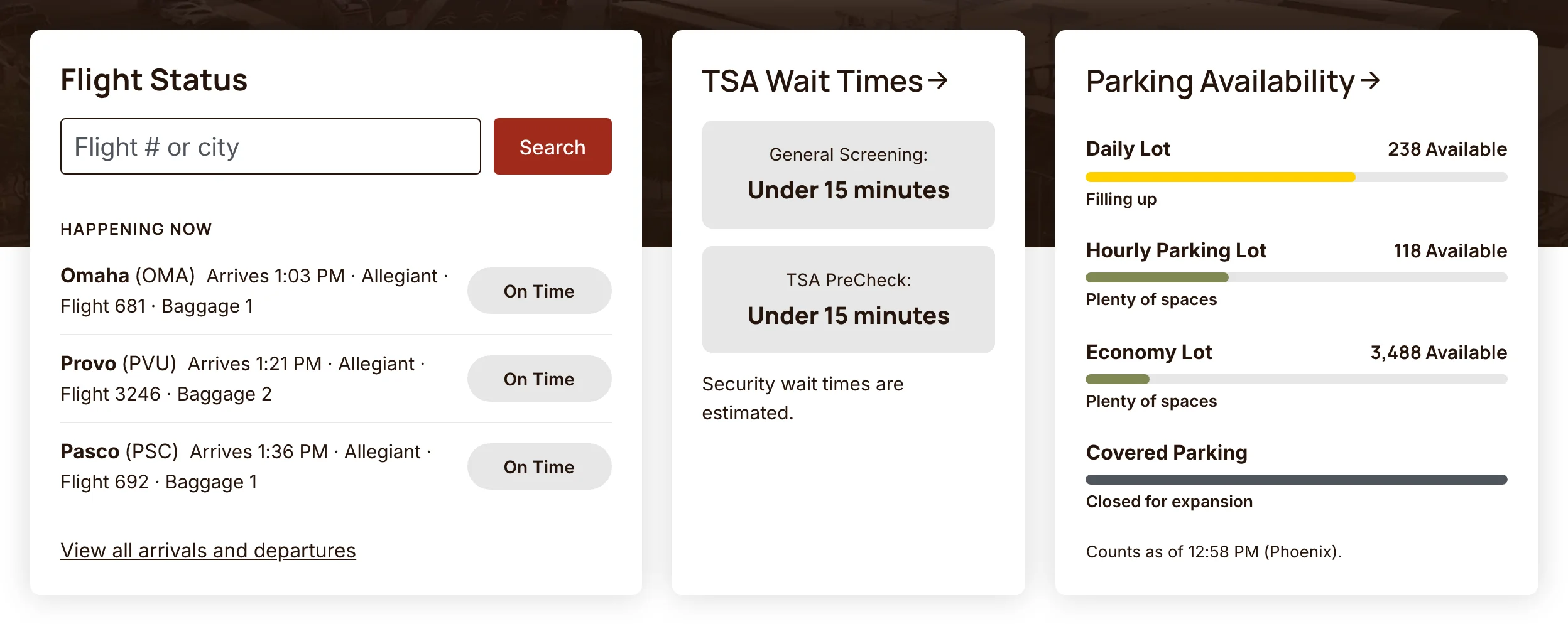
Flight information
Live arrivals and departures from your FIDS or flight data provider, on your homepage, on a full flight board and inside the chat assistant. We’ve connected SITA, AeroCloud, OAG and airport-run FIDS feeds.
Your staff: manage airline names, logos and links in one place.
If the feed drops: the site keeps showing the last good update and marks data that’s gone stale, instead of an empty board or an error.
Security wait times
Wait times by checkpoint, from TSA data or your own sources.
Your staff: override a checkpoint, schedule an override ahead of a known rush, or log waits by hand.
If the feed drops: Foxtrot estimates the wait from the day’s departing seats, and says “unavailable” before it would guess.
Parking
Lot-by-lot availability from your parking system, plus rates, a parking cost calculator and links to reservations.
Your staff: set any lot to Plenty, Filling up, Nearly full or Full, or post a closure message.
If the feed drops: those manual settings keep working, so the website is never stuck on old numbers.
Weather
Current conditions and the forecast for your airport. FBO and general aviation sites can add aviation weather (METARs and TAFs).
Routes and destinations
Route maps, nonstop lists and featured destinations. Mark a new route “coming soon,” and it switches to “now flying” on its start date on its own.
Business and public records
A procurement center with vendor registration and plan-holder lists, board meetings and public notices, FBO fuel prices and an aircraft fee estimator, and a document library with retention rules and version history.
AI chat and search
A traveler assistant and site search that answer from your own pages and live data. How it works.
Terminal and campus maps
Accessible interactive maps that show live parking, security waits and flight-to-gate, synced with your directory of shops and restaurants. Staff place pins in a visual builder.
- Tap a gate to see its next departures.
- Search the directory, and the map takes you there.
- Switch to the campus view for the parking lots and how full they are.
Screen recording on a phone of the terminal map on gatewayairport.com. The visitor zooms in and taps Gate 5, which opens a panel: past security, with the next Allegiant departures to Peoria and Provo, all on time. They open Search & directory, type “restroom” and pick one, and the map moves to the restroom between Gates 5 and 6. Then they switch to Campus & parking and tap the Daily Lot: 267 spots available, filling up, with directions.
Emergency alerts
Pick a template, fill in the blanks and confirm once. The alert shows on every page within about 30 seconds, even on cached pages, in your site’s own banner style.
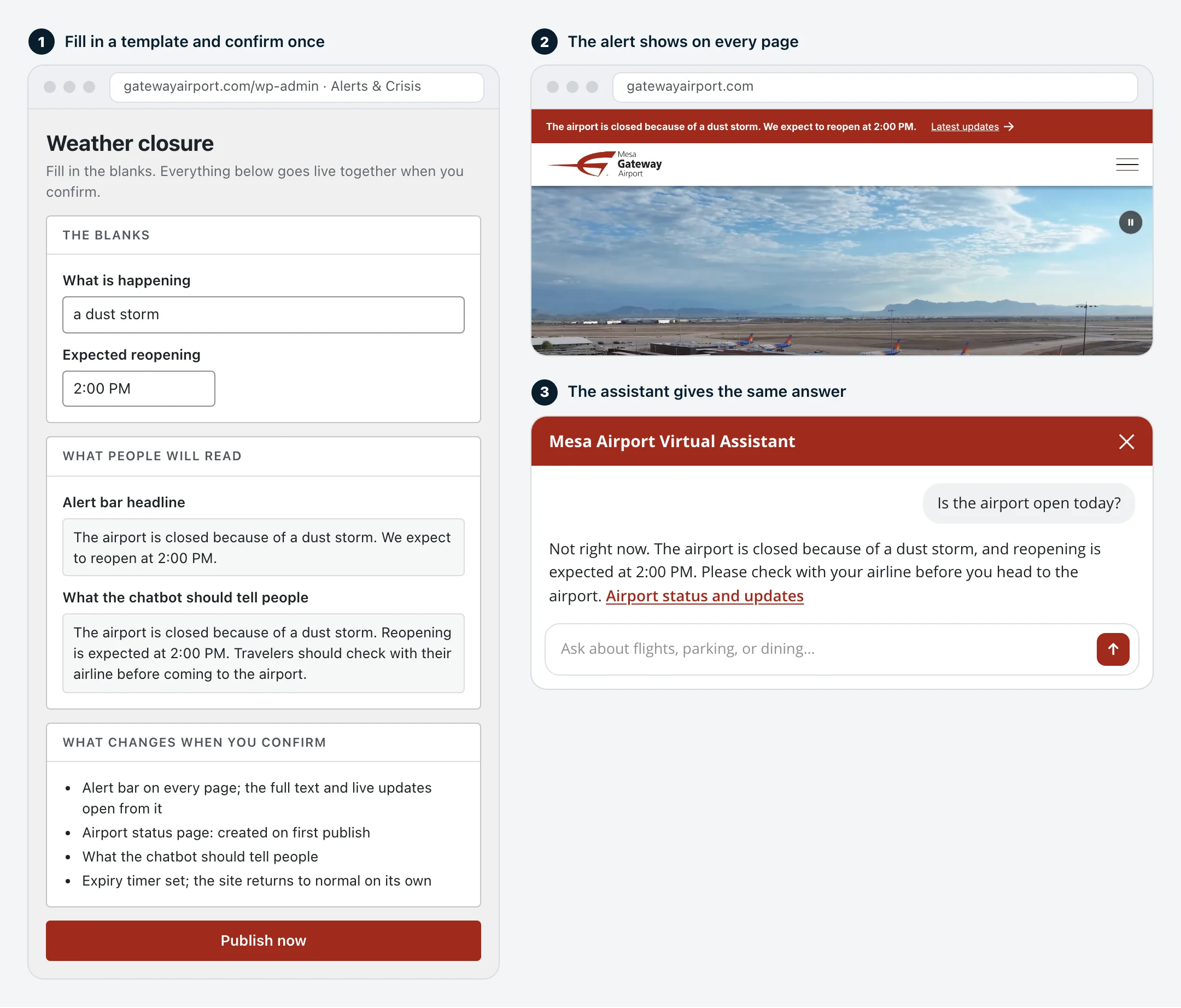
- Post timestamped updates as the situation changes, set when the alert expires, and reuse a past incident as the starting point next time.
- Only Crisis Communicators and Airport Admins can publish. Others can prepare drafts.
- Screen readers announce urgent alerts as soon as they appear.
- The chat assistant reads the same alert, so “is the airport open?” gets today’s answer.
Templates for weather closures, security incidents, road and parking closures and systems outages come ready to use. Better still, we load the approved messages from your crisis communications plan, so the first public statement in an emergency is one your leadership has already signed off on. If you don’t have a plan yet, we write those too. If your airport uses Everbridge and its API is available, those alerts can show on the site as well.
Made for the people who run your site
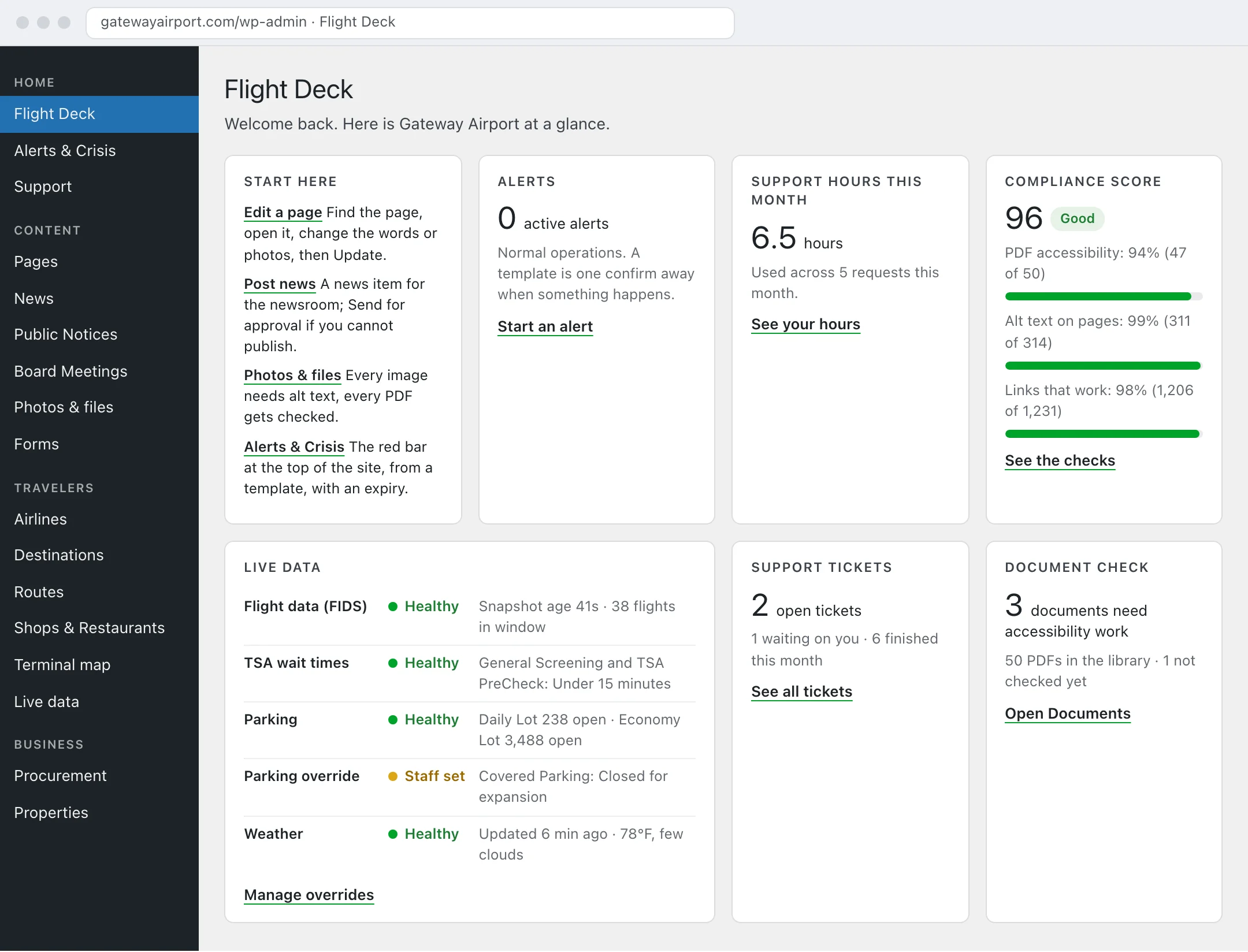
- Plain-language menus, grouped by job: Content, Travelers, Business, Community, People and Reports. Nobody has to learn WordPress terms.
- A Flight Deck home screen with what needs attention today: active alerts, support hours and tickets, your accessibility score and documents that need work.
- Roles that fit an airport: Airport Admin, Content Manager, Approver, Crisis Communicator and more. Airport Admins manage users but can’t break the site.
- Update once, show everywhere. Airlines, destinations, shops and staff contacts are kept in one place and update on every page that lists them.
- Accessibility checks before publishing. Editors are flagged about missing alt text, skipped headings, “click here” links and hard-to-read sentences. PDFs are checked the moment they’re uploaded, and a PDF can be turned into an accessible web page draft.
- Support built in. See support hours used, open tickets and our replies without leaving the admin.
For your IT team
The details your IT and security reviewers will ask about, in one place.
Technical details: hosting, data feeds, releases and access
- Hosting. WP Engine’s enterprise platform on AWS, Google Cloud or Azure (SOC 2 Type II audited, ISO/IEC 27001:2022 certified), with a 99.99% uptime SLA and high-availability failover for airports that need it. Global Edge Security puts a managed firewall, DDoS protection and bot management in front of every site. More on hosting and security.
- Data feeds. A scheduled server job pulls each vendor feed and saves a copy, and pages read the saved copy. Visitor traffic never reaches your vendor’s API, and a feed outage doesn’t take a page down.
- Releases. Each site’s build includes only the modules it uses. Production runs only modules cleared for production, every change is tested on staging first, and a release can be rolled back in one step.
- Configuration and keys. Site settings live outside the public web folder. Service keys are held in Azure Key Vault.
- Access. Role-based permissions throughout. Airport Admins can’t grant administrator rights. Single sign-on is available.
- Accessibility. Built and tested to WCAG 2.1 AA, the Title II standard, and in most cases designed to WCAG 2.2 AA as well. Every site gets a certificate of conformance, and a VPAT is available on request.
- Open data. Feeds like alerts and nonstop routes are available as JSON for your other systems, like signage or apps.
See Foxtrot from the staff side
We’ll show you the Flight Deck, an alert going live and the live data controls on a working airport site.